Quilt Creator
- 1.4
- Rating
- 10.00K
- Installs
- Free
- Price
 Analysis by App-foxy
I opened Quilt Creator expecting a simple way to browse quilt ideas, but its more useful role is as a lightweight planning space for people who enjoy arranging blocks before committing to fabric. It belongs to the Art & Design category, comes from Crochet Designs, and focuses on selecting from a large library of quilt blocks to build a personal composition. That sounds modest, and it is, but the distinction matters: this is not a replacement for cutting mats, fabric samples, or a full design workstation. It is a pocket-sized sketching aid for the early, imaginative part of quilting.
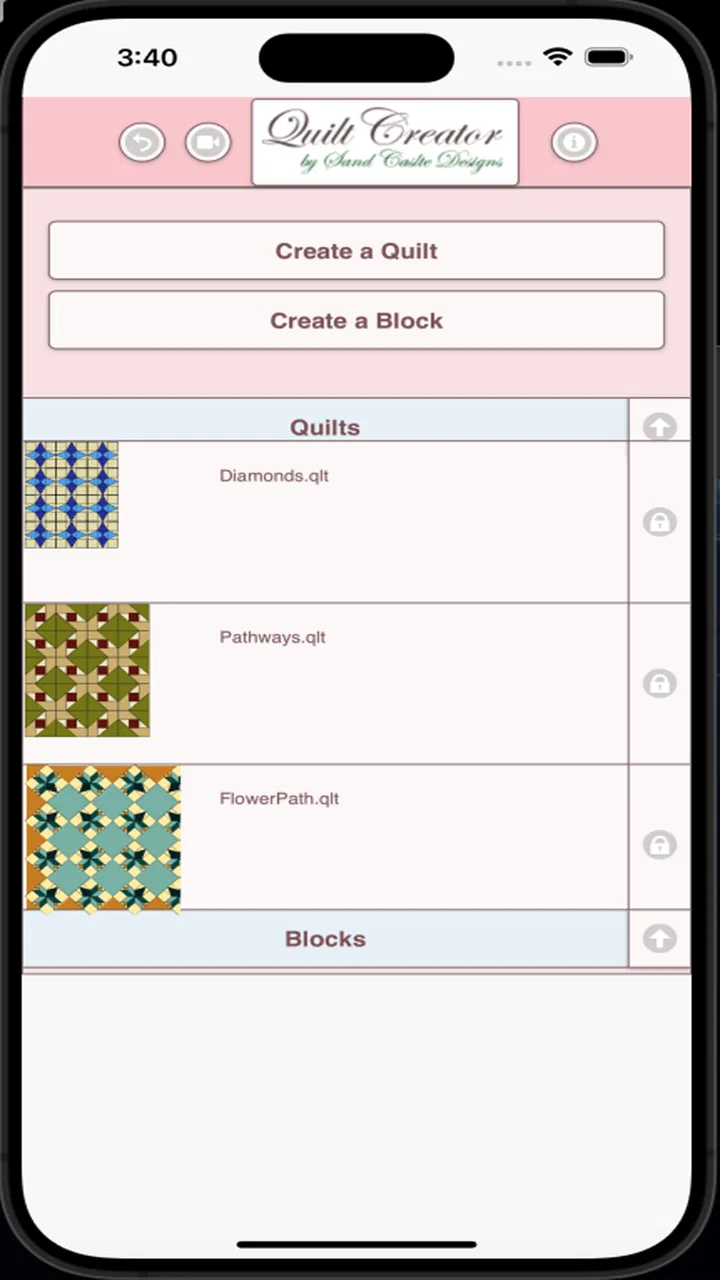
My first impression was shaped by the sheer amount of material available. The app offers over 200 blocks, so the opening session has plenty of visual browsing. I could move from familiar geometric arrangements to combinations that made me rethink how repeated shapes might work together. That initial discovery is the strongest part of the experience. It gives a beginner somewhere to start and gives an experienced quilter a quick way to interrupt a creative rut.
The app is free to install and suitable for everyone, which makes experimenting easy. It has been available since January 2018, and the current version is 26.2.3. Those details suggest a long-running utility rather than a brand-new trend, although its modest audience is reflected in just over ten thousand installs. Its average rating is 1.4 from roughly 164 ratings and 81 written reviews, so I would not ignore the warning signs. My own view is more nuanced: the concept is handy, but the practical experience has enough rough edges that it will not suit every quilter.
You May Also Like

 AccuWeather: Weather Radar
AccuWeather Review: A Quick, Clear Forecast for Everyday Decisions
For everyday plans, the best forecast is the one you can understand quickly. AccuWeather makes rain timing, radar, and local conditions easy to act on, with a few trade-offs.

 Hill Climb Racing
Why Hill Climb Racing Still Turns Crashes Into One More Run
A tiny car, a bumpy hill and one more upgrade: Hill Climb Racing keeps resurfacing because its simple chaos makes every near-miss feel personal.

 AliExpress - Shopping App
AliExpress Makes Global Shopping Feel Personal, but Shoppers Bear the Risk
AliExpress turns a global marketplace into a pocket-sized discovery engine. Its reach is useful, its shopping loop compelling, and its trade-offs easy to miss.

 Lords Mobile: Kingdom Wars
Lords Mobile Is a Kingdom-Building Routine, Not a Quick Match
A case-by-case verdict on the building, battles, device demands, and social commitments that make Lords Mobile rewarding for some players and exhausting for others.

 PDF Scanner app - TapScanner
TapScanner Makes Paperwork Easier to Capture, Check, and Share
TapScanner makes scanning with a phone feel less like a rescue operation and more like a dependable step in getting work done. Its capture tools are useful, though not flawless.

 Block Blast!
Block Blast! Shows How Much a Puzzle Game Can Leave Out
A quiet grid game shows why puzzle players increasingly value instant clarity, repeatable skill and low-pressure play—and where the genre still needs to catch up.
More From Our News Desk
View All News


From the first week to a lasting quilting habit
When I move beyond the novelty of browsing, I find the app works best as a small, repeatable prompt: bring one project question, explore a few block directions, and carry the strongest idea into a notebook or fabric test. That routine can make occasional sessions more useful without turning them into a chore. The next section looks at how clearly the app supports different readers, hands, and everyday settings.
Why the first sessions are appealing
The first week is where Quilt Creator makes its best case. Choosing blocks is more immediate than drawing every square by hand, especially when I want to compare several directions quickly. A block library also changes the rhythm of planning. Instead of beginning with a blank page, I can start with a recognizable structure, notice what feels promising, and then build a broader arrangement around it.
That approach is particularly useful when I have a vague theme but no finished design. For example, if I want a quilt that feels orderly without becoming dull, I can begin with a block containing strong diagonals, place it beside calmer shapes, and judge whether the contrast feels intentional. The value is not that the app makes the decision for me. Its value is that it reduces the effort needed to create several possible starting points.
A beginner can also use the block collection as a visual vocabulary. Quilt terminology can be intimidating when a person is still learning how units relate to one another. Seeing many block styles together helps turn abstract names into patterns that can be recognized. I would still use a sewing reference or a trusted quilting guide for construction instructions, but the app is a gentler entry point for composition.
One of my favorite early uses is a “three-minute challenge.” I choose a block that I would not normally pick, pair it with a contrasting shape, and make a quick arrangement before judging it. This prevents endless browsing from becoming passive scrolling. It also reveals an important truth about the app: its strongest output is not a finished quilt plan every time, but a prompt that gets me thinking with more intention.
What it can and cannot replace
It is important to set expectations before downloading. Quilt Creator is best understood as a design companion, not a complete quilting studio. It can help me explore block combinations, but it does not remove the need to think about fabric behavior, seam allowances, cutting accuracy, scale, borders, or the order in which pieces will be sewn. A pleasing screen arrangement can still become awkward when translated into real cloth.
This is where the app compares differently with the usual alternatives. A notebook gives me total freedom and keeps a physical record, but it takes longer to redraw an idea. A general drawing app usually offers more control over color, layers, and custom shapes, yet it requires me to construct quilt elements manually. A dedicated desktop quilt-design tool may be better for precise measurements and production planning, while Quilt Creator is easier to approach when I only want to explore a concept on a phone.
I would choose this app over a blank sketchbook when I need quick visual prompts. I would choose a more technical design program when I am preparing a complex quilt that depends on exact dimensions. That trade-off is not a flaw by itself; it simply defines the audience. The app earns its place when speed and inspiration matter more than detailed manufacturing control.
A realistic everyday workflow
Imagine that I am waiting for an appointment with a few minutes to spare. I have been thinking about a gift quilt but cannot decide whether the design should feel traditional or playful. I can open the app, browse blocks, save a mental shortlist, and test which shapes seem to belong together. Later, at home, I can recreate the promising arrangement in a notebook beside fabric swatches. The phone session does not finish the project, but it helps me avoid starting from nothing.
Another practical workflow is to use it before shopping. I can select a small group of blocks first, then look at my fabric shelf and ask whether the colors and textures I own will support those shapes. This reverses the common habit of buying fabric impulsively and searching for a design afterward. The app is more valuable when it sits at the beginning of a decision process rather than being treated as the final authority.
A useful tip is to take notes outside the app while browsing. I would record the block names or descriptions that catch my attention, along with the reason they work for a particular project. Without that habit, the large collection can become a blur. The library encourages discovery, but the user still needs a personal system for turning discovery into a manageable shortlist.
Month-to-month value after the novelty fades
The central long-term question is whether I will return after the initial browsing excitement disappears. For me, the answer depends on how many quilting projects I have in progress. Someone who regularly designs quilts can revisit the library whenever a new project needs a starting point. Someone who only wants one finished pattern may enjoy the first session and then have little reason to open it again.
Recurring value comes from changing the question I bring to the app. The first visit asks, “Which blocks do I like?” A later visit should ask, “Which block solves the problem in front of me?” That problem might be a narrow bed width, a need for a calmer center, a desire to use scraps, or a wish to balance busy fabric with open space. The app becomes more useful when I search with a constraint instead of browsing without a purpose.
I also see value in using the collection as a monthly creative exercise. Once a month, I can choose an unfamiliar block and sketch three arrangements around it in a notebook. This creates a repeatable habit without pretending that the app itself supplies an entire course in quilt design. The recurring practice comes from the user’s method, not from constant new content.
There is a practical limitation here. A block library can inspire variation, but it can also keep me inside the boundaries of preselected designs. If I want to invent a completely original motif, manipulate individual units freely, or test exact proportions, a more flexible drawing tool will serve me better. The app supports recombination more naturally than deep customization.
Maintenance, friction, and the cost of keeping it useful
The maintenance burden is low in one sense: there is no physical setup, no fabric to organize, and no cutting waste while I am experimenting. I can return to the app whenever an idea appears. That convenience is valuable for casual planning, particularly when my sewing area is packed away or I am away from home.
However, digital convenience does not automatically create an archive. I would not rely on memory alone to preserve a promising concept. My better routine is to record the selected blocks, write down the intended color relationship, and photograph or sketch the version I want to keep. This extra step may feel unnecessary during a quick session, but it prevents an interesting idea from vanishing when I move on to another project.
The free entry point makes testing straightforward, but in-app purchases cost $2.99 per item. That means I would explore the free experience carefully before spending anything. A purchase can make sense if it unlocks something I will repeatedly use, but it is harder to justify for a person who only wants occasional inspiration. Since the app’s basic appeal is browsing and arranging ideas, the value of any individual purchase depends heavily on how often I quilt.
There is also a maintenance question around device fit. The minimum operating system is Android 5.1, which gives it a broad technical starting point, but compatibility alone does not guarantee a comfortable experience on every modern phone or tablet. I would pay attention to how clearly blocks display on my own screen and whether the interface feels manageable during longer planning sessions. A tool that is pleasant for five minutes may become tiring when I use it to compare many alternatives.
Where fatigue begins
The same abundance that makes the first week enjoyable can become the main source of fatigue. Over 200 blocks create choice, but they also create decision pressure. Without a clear project goal, I can spend more time browsing than designing. This is a familiar problem with visual libraries: more options feel liberating at first, then make it harder to commit.
My solution is to impose limits. I might select only five blocks, choose one dominant shape, or decide that every candidate must work with fabric already in my home. Another useful rule is to stop after three plausible arrangements rather than continuing until I find a perfect one. Quilt design benefits from editing, and the app is easier to use when I treat it as a source of candidates rather than an endless catalog.
Another fatigue point is the gap between visual appeal and sewing reality. A screen can make a pattern look balanced while hiding the work involved in piecing it accurately. If I am planning a serious project, I would follow every app session with a paper check: estimate the finished block size, consider how many repeated units are needed, and think about whether the seams will create awkward bulk. This two-stage workflow is slower than trusting the screen, but it is much less likely to produce an impractical plan.
The low average rating also deserves a place in my decision. I would not treat it as proof that the concept is worthless, but I would approach the app with modest expectations and avoid paying immediately. The small install base reinforces that this is a niche utility, not an essential tool used by every quilter. For me, that means the download is easy to justify as an experiment, while a paid commitment requires a clear personal use case.
Who should make room for it
I think Quilt Creator is a reasonable choice for beginners who want visual guidance before learning more technical design methods. It is also useful for hobbyists who enjoy collecting ideas, quilters who need a quick prompt during spare moments, and teachers or group leaders who want a simple way to start conversations about block structure. Its approachable premise makes it less intimidating than a professional design package.
It may also help an experienced quilter who is stuck. Familiarity with construction techniques means that person can supply the missing practical judgment: checking scale, fabric contrast, and assembly. In that situation, the app does not need to be sophisticated to be useful. It only needs to create enough variation to restart the creative process.
I would skip it if my main goal is exact quilt engineering. If I need precise yardage, automatic calculations, custom block construction, or a detailed production plan, I would look toward a specialized computer tool or a more capable drawing application. I would also skip it if I dislike browsing libraries or prefer to invent every shape from scratch. The app’s structure is helpful only when its selection-based approach matches the way I like to think.
My long-term verdict
After the novelty fades, Quilt Creator earns a limited but genuine place in my toolkit. I would not keep it open every day, and I would not use it as the only planning method for a major quilt. Its lasting value comes from short, purposeful visits: finding a block that breaks a creative stalemate, comparing a few possible directions, or preparing ideas before working with real fabric.
The developer, Crochet Designs, has made something more useful than the brief “Quilt Creator” label might suggest, but the app remains a focused utility rather than a complete design environment. The free price lowers the risk of trying it, while the $2.99 per-item purchases make restraint sensible. I would begin without buying anything, test whether the block collection fits my projects, and only consider an extra purchase after I had used the app repeatedly.
My recommendation is therefore conditional but positive. If you want a compact source of quilt-block inspiration and are willing to carry the serious planning work into a notebook, fabric test, or technical tool, this app can become a handy part of your routine. If you expect it to calculate, customize, and document an entire quilt for you, it will feel limited quickly. Its lasting strength is not automation; it is the small creative push that helps me move from “I want to make something” to “this is the direction I will test next.”
FAQs for Quilt Creator
01What is Quilt Creator, and what can I use it for?
Quilt Creator is a digital design application for planning and creating quilt patterns. After exploring its tools, I found that it is mainly useful for arranging blocks, experimenting with colors and fabrics, and visualizing how a finished quilt may look before cutting material. It can help beginners develop ideas and give experienced quilters a convenient way to test layouts.
02Is Quilt Creator suitable for beginners?
Yes, Quilt Creator can be useful for beginners, especially those who want to understand quilt layouts without immediately purchasing fabric or making test blocks. The visual approach makes it easier to experiment with patterns and color combinations. However, new users may need some time to learn the available controls, particularly if they have never worked with digital quilt-planning software before.
03Can I customize quilt patterns, colors, and block arrangements?
The main appeal of Quilt Creator is the ability to personalize a design rather than simply follow a fixed template. You can generally experiment with different block arrangements, color selections, and fabric-style combinations to create a layout that matches your idea. The extent of customization may depend on the version of the app and the tools available on your Android or iOS device.
04Does Quilt Creator provide measurements or instructions for making a real quilt?
Quilt Creator is best viewed as a planning and visualization tool, so users should not assume that every design automatically includes complete sewing instructions or production-ready measurements. Before starting a physical project, carefully check the pattern details, block dimensions, seam allowances, fabric requirements, and scaling information. You may still need quilting knowledge or an additional pattern guide.
05Is Quilt Creator free to download, and are there in-app purchases?
The download and pricing model can vary according to the platform, region, and current app version. Some features may be available at no cost, while advanced design tools, additional pattern collections, export options, or an ad-free experience may require payment. Before downloading, review the Google Play Store or Apple App Store listing to confirm the latest price, permissions, subscriptions, and purchase conditions.
Pros
- Simple tools make designing quilt patterns approachable for beginners.
- Pattern ideas can help users plan color combinations and layouts.
- Useful for experimenting with designs before cutting fabric.
- Lightweight app with a straightforward
- uncluttered interface.
- Can inspire custom projects without requiring advanced quilting software.
Cons
- Limited advanced editing options may frustrate experienced quilters.
- Small screens can make detailed pattern adjustments difficult.
- Some designs may require manual calculations for fabric quantities.
- The app may not replace specialized quilting design software.
- Export and sharing options can be limited depending on the device.

Quilt Creator
Gallery